The Ultimate Guide to Getting a Monthly $10k Google Ad Grant

Telling your organization’s story is essential for engaging supporters, but standing online can feel overwhelming. In today’s digital world, creating an online presence is an important part of getting the word out. With smart digital advertising, you can reach volunteers, donors, and engage members quicker than ever, though the cost of digital ads can rise quickly and limit how far your message goes. Digital advertising can be a very effective method of reaching your community members, but it’s hard to create a meaningful impact with a low (or nonexistent) ad spend budget. That’s where Google Ad Grants comes in.
Google’s $10,000 monthly grant gives nonprofits a real chance to compete online without paying out of pocket.
What is a Google Ad Grant?
Established to help promote helpful and accurate information on the internet, Google’s grant program helps fund digital search ads for nonprofits. Qualifying nonprofits receive up to $10,000 per month of digital ad spend.
This funding makes digital advertising far more accessible, especially for smaller organizations.
Google’s funding for nonprofit organizations has made advertising more accessible. Nonprofits can now create their own ads and use the funding to promote them next to search results. The ads appear when people search for information relevant to your mission or services. This lets you reach people who are already looking for what you offer.
With the right keywords, your ads show up exactly when someone needs your services.
How Do Google Ad Grants Work?
Google Ad Grants are available to any qualifying nonprofit, regardless of size. There’s no spend requirement, but the funds don’t roll over between months.
Each month, you’ll have an ad budget in your Google account where you can manage your ad campaigns. You’ll create your ads independently and add them to your Google account. When someone searches for a topic relevant to your nonprofit, your ads will be shown either independently or below the paid ads. Viewers will be able to click through your ads to your nonprofit website if they’re interested.
You can use the ads for a variety of mission-based campaigns, from volunteer recruitment to driving membership sales to grow community engagement. They can also be used to generate donations by connecting visitors straight to your donation platform.
Google Search campaigns reward relevancy in your search ads. The more aligned your keywords and landing pages are, the better your ads perform. You can increase your campaign’s impact by using specific keywords in your ads that directly relate to your brand and mission. Since Google promotes keyword relevancy rather than showing ads with the largest budgets, the program levels the playing field for small nonprofits who may not be able to out-spend bigger organizations in their region.
How Do I Qualify for Google Ad Grants?
To apply for Google Ad Grants in the U.S., you must be a nonprofit organization with current 501(c)(3) status. If you’re outside the U.S., check your country’s definition for charity status. You’ll also need to register your nonprofit with TechSoup, the organization that handles Google’s nonprofit verification process.
Google wants the ads they fund to promote helpful and accurate information, so you’ll need a website that meets the Google Ad Grant performance requirements. If you’re already keeping your website up to date, chances are you already meet the requirements:
- You must be the registered owner of your website domain.
- If you want users to land on an offsite donation page when they click your ad, you must use a domain processor verified by Google.
- Your website must be considered high-quality, secure (with HTTPS), and contain content that is substantial and unique to your organization.
- The purpose of your website should not be commercial. If you have limited commercial activities, you must explain how they support your organization.
- You should limit any advertising on your website that isn’t directly related to your mission.
- Google AdSense or other affiliate advertising links are not allowed.
How do I apply for Google Ad Grants?
Compared to most grants, the application process for Google Ad Grants is very easy. You don’t have to compete with other nonprofits, and there is no application deadline. But before you submit your application, there are a few prerequisites:
- Register your organization with TechSoup.
In addition to providing discounted tools and resources to nonprofits, TechSoup has partnered with Google for Nonprofits to verify your eligibility with their validation token. This could take up to 30 days, and TechSoup may contact you for additional information if needed. - Sign up for Google for Nonprofits.
Once you have your validation token, the next step is to enroll in Google for Nonprofits. In addition to the validation token, you’ll need to agree to Google’s statements about donations and nondiscrimination. Be prepared to enter your personal contact information and your organization’s information, including your tax ID/EIN. - Set up Google Analytics on your website.
With its robust (and free) web-reporting tools, Google Analytics can track your website’s visitors and analyze their behavior. Not only is Google Analytics required to receive your Google Ad Grant, but you’ll also need it to measure effectiveness.
Once you’ve completed these three steps, you’re ready to apply for your Google Ad Grant.
- Sign into your Google for Nonprofits account and select “Activate” under Google Ad Grants. Fill out the eligibility form and submit your organization’s website for review. It’s important to follow the instructions carefully and complete all requirements in steps one and two to receive approval.
- You don’t need to create a new Google Ad Grants account. A Google Ad Grants account will be provided when activation is completed. During the application process, you’ll choose between Smart Campaigns or the Classic Google Ads account. Smart mode is more simplified, but choose the Classic version if you want access to the full suite of tools and options Google provides (you can switch later).
WARNING: Never enter billing information when setting up your ads. It isn’t required and can cause serious issues later in the process. - Set up conversion tracking on your website. Install Google Tag Manager to create trackable goals (memberships, donations, volunteers, etc.). Tracking these goals helps you identify which pages or ads create the most efficient path for visitors to complete desired actions.
If you’re starting from nothing, the entire process can take more than a month to complete. It’s important to complete each step correctly to avoid setbacks and delays.
Here is an average timeline to complete each step:
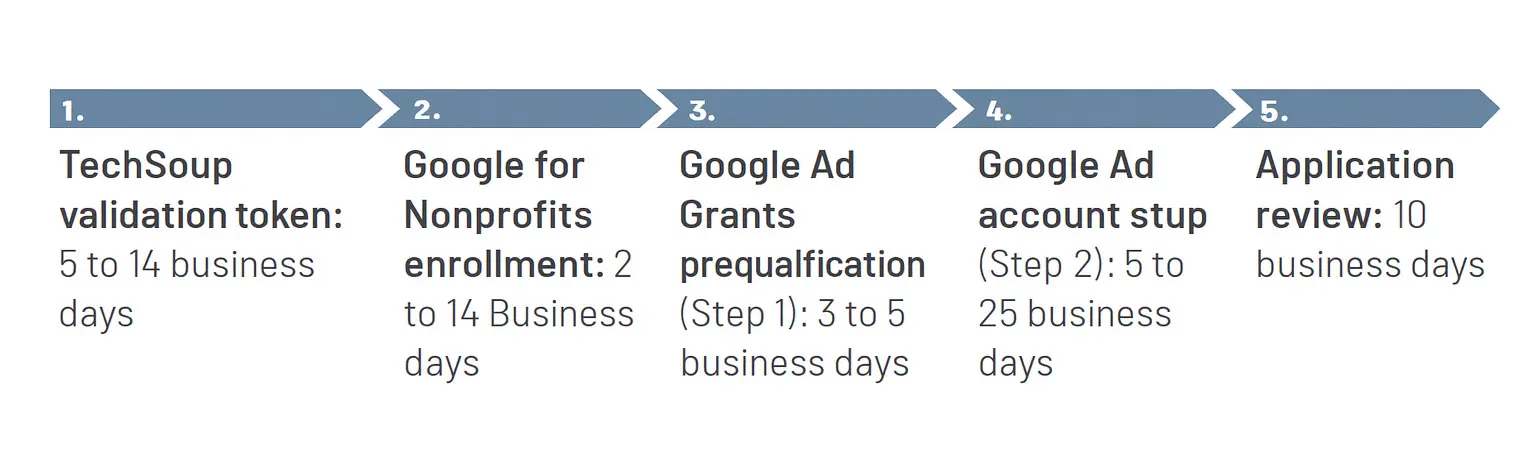
Google updated its Ad Grant policies in 2018 with some important eligibility and management requirements. Here are the most important ones to focus on when setting up your account.
- Account Structure
- Google requires a minimum of two campaigns.
- Each campaign must have at least two ad groups.
- Each ad group must have at least two ads.
- Each ad must have at least 2–4 sitelink extensions.
- Keywords
- Single-word keywords are not allowed (unless they are your own branded keywords).
- Generic keywords are not allowed.
- Keywords with a Quality Score of one or two are not allowed.
- Pause or remove any keywords with a Quality Score below 3.
- Performance
- Your Google Ad Grants account must maintain a 5% clickthrough rate (CTR) each month.
- You must have at least one conversion reported in your account each month.
- Program Survey
- You must complete the Google Ad Grants program survey each year.
How to plan and build your Google Ad Grants campaigns
Now that you know about Google Ad Grants, it’s time to plan and build your first campaign. First, start with a plan. Google Ad Grant campaigns may look like paid Google Ads campaigns, but you need a different strategy to be successful.
Paid Google Ads campaigns give you access to the full suite of Google ad products: Search, Display, Shopping, Video, remarketing lists, and expanded access to branded keywords. Paid ads can also manage budgets without limitations and compete for desired keywords more effectively.
Google Ad Grants aren’t as flexible, and they are held to a higher standard. While it’s hard to find fault with free advertising dollars, a few drawbacks must be considered when planning your campaign.
- Search Ads: Google Ad Grant ads can only deliver text-based ads on Google search results pages. To take advantage of a multichannel digital marketing campaign, you’ll need to create a paid Google Ads account and invest additional funds for other Google products (Display, Shopping, Video, etc.).
- Budget Limitations: Even though Google provides $10,000 per month, there are restrictions on how those dollars can be spent. Google limits your bidding to $329 per day, and any money not spent doesn’t roll over. If you spend only $250 in one day, you can’t make up the difference the next day. Any unused budget is lost.
- Cost-per-click Limitations: Google sets a maximum cost-per-click bid of $2 per keyword. This can make competing with paid Google Ads challenging when keywords cost significantly more. Depending on competition, paid advertisers may outbid you for top placements.
- Ad Placement: Paid Google Ads always receive preferential treatment. Grant ads only enter the auction if inventory is available. If a paid advertiser bids the same amount, the paid ad wins the higher placement.
So how can you make the most of your Google Ad Grants account with these limitations? This is where strategy differs from paid advertising. The most important thing to remember is that you’re working with free money—and if you don’t spend it, it’s gone forever. Instead of focusing on ROI or ROAS, your priority should be spending the full daily budget consistently. It won’t be easy, but the following strategies will help.
More Is Better
Google requires you to run at least two campaigns with two ad groups and two ads each. While that’s a great start, you probably won’t be able to use the total budget by sticking with the minimum requirements.
Spend some time combing through your website and list all the areas that can support advertising.
Spend time reviewing your website and list every page that can support ads:
- Multiple locations
- Membership options
- Programs, classes, events
- Volunteer opportunities
- Recurring vs. one-time donations
Each topic can become its own campaign or ad group.
And if your website doesn’t have a page to fully support those or other opportunities, then it’s time to expand your website or develop some landing pages.
The more campaigns, ad groups, and ads you run, the closer you’ll get to those free funds.
Maximize the Daily Budget
With $329 to spend every day, many nonprofits divide the budget equally between each campaign they’re running. If they’re running four campaigns, they’ll set a daily budget of $82.25 for each campaign.
But these aren’t paid ads. Google limits the total daily spend to $329, so instead of segmenting and self-limiting, set each campaign’s daily budget to the full $329 and let Google optimize spend toward the highest-performing campaigns.
Use smart bidding
Google’s $2 cost-per-click cap can be exceeded when you use Smart Bidding strategies.
Smart Bidding uses machine learning to optimize for conversions in every auction. Once conversion tracking is set up, these strategies can break through the $2 bid cap:
- Target CPA: Set the cost you’re willing to pay per conversion and let Google maximize conversions at that price.
- Maximize Conversions: Drive as many conversions as possible regardless of individual costs.
- Target ROAS: Adjust bids based on predicted conversion value to avoid overspending on low-value actions.
Use ad extensions
Maintaining a 5% or higher click-through rate is critical. Sitelink extensions act as mini ads within search results, directing users to specific pages and increasing ad visibility, authority, relevance, and CTR.
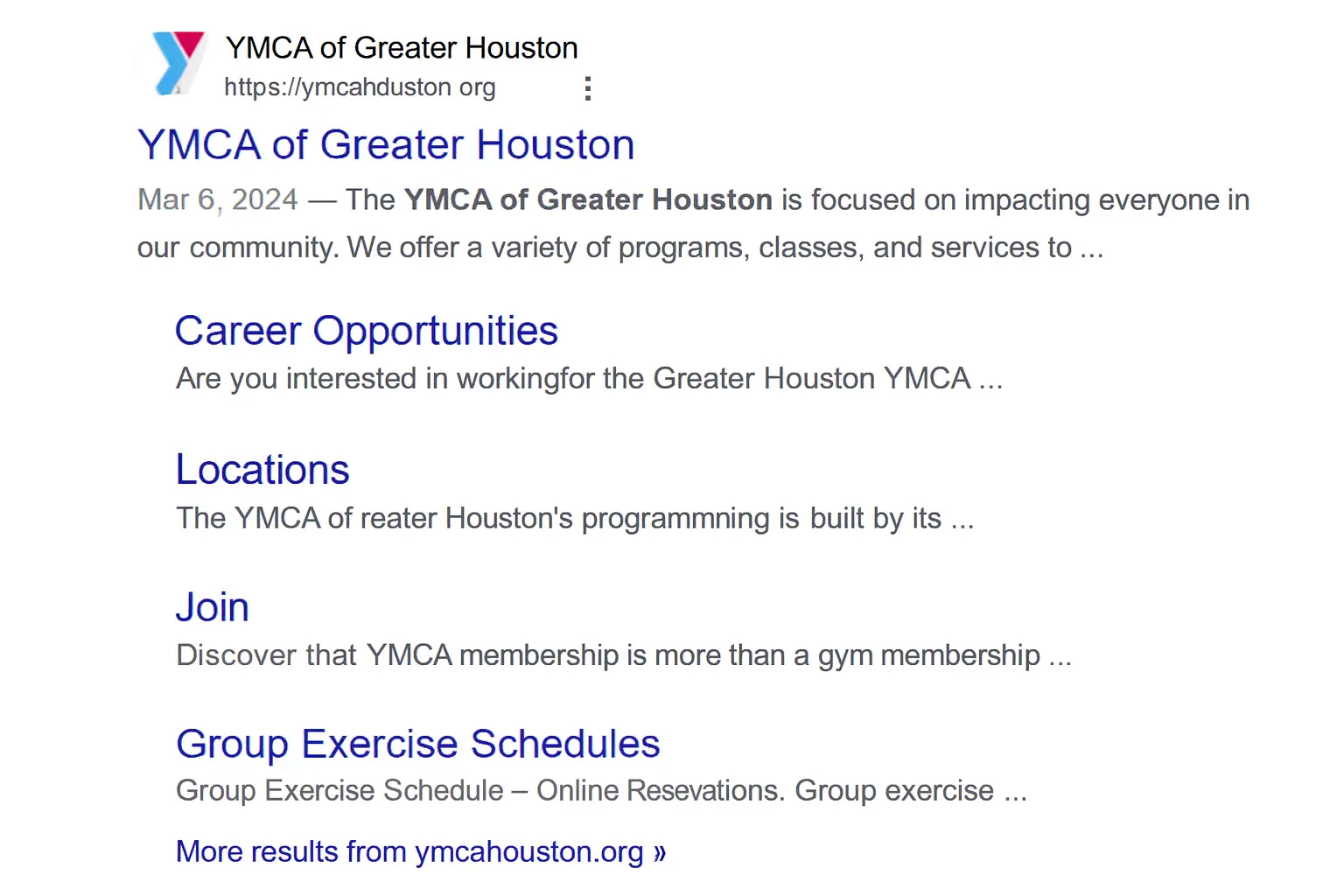
We recommend turning off Google’s automated extensions and adding your own to have more control over what displays alongside your ad. Ads can display up to four sitelink extensions, so you should include at least four (preferably more) when setting up your campaigns.
Need some sitelink ideas? Use Google Analytics to see which pages are already popular with your website visitors. Those pages are likely to attract more interest and drive more clicks when people are searching for your organization.
Sitelink extensions aren’t the only type of ad extensions you can use to your advantage. Call extensions, location extensions (served through your Google Business Profile account), and callout extensions may also help your campaigns.
Set up automated rules
To keep search results relevant, Google requires your Ad Grant keywords to maintain a high-Quality Score, and they can suspend your account for using keywords with a Quality Score of one or two. But who wants to check their campaigns daily for low-quality keywords?
The solution is to set an automated rule in Google Ads to pause any keyword if the Quality Score drops to a two or lower. You can even ask the system to send you an email when the rule is implemented. If you reach a point where your keywords are frequently being paused, it may be time to start digging for some fresh, new keywords.
If you need help figuring out the best search terms for an ad group, there are many free keyword research tools. Here are a few:
- Google Keyword Planner: Provides a way to research new keywords related to your business and view estimated monthly searches and the cost to target them. And it’s free to use with any Ad Grant account!
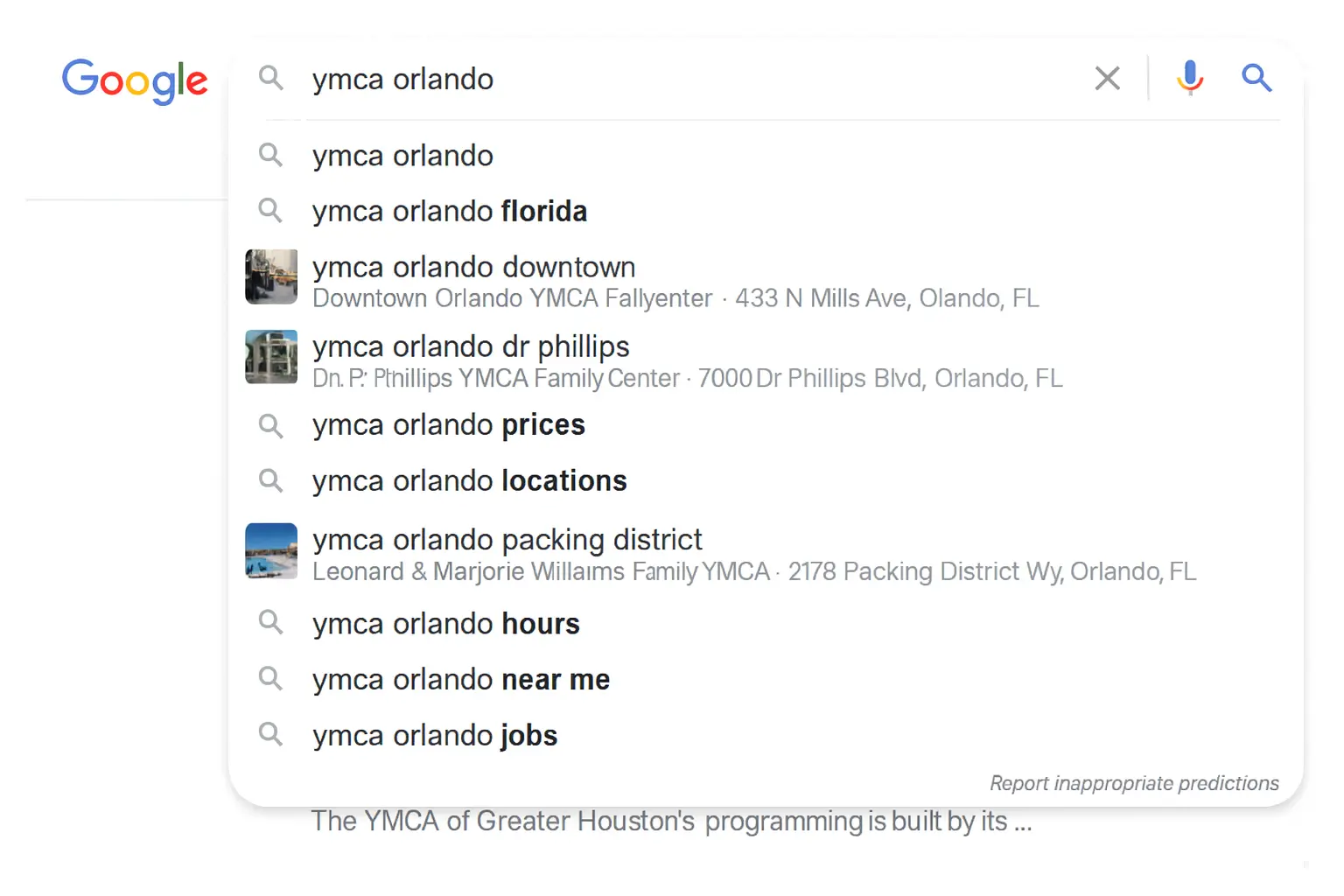
- Google Search Suggestions: It appears as a dropdown box as you type in the Google search bar.
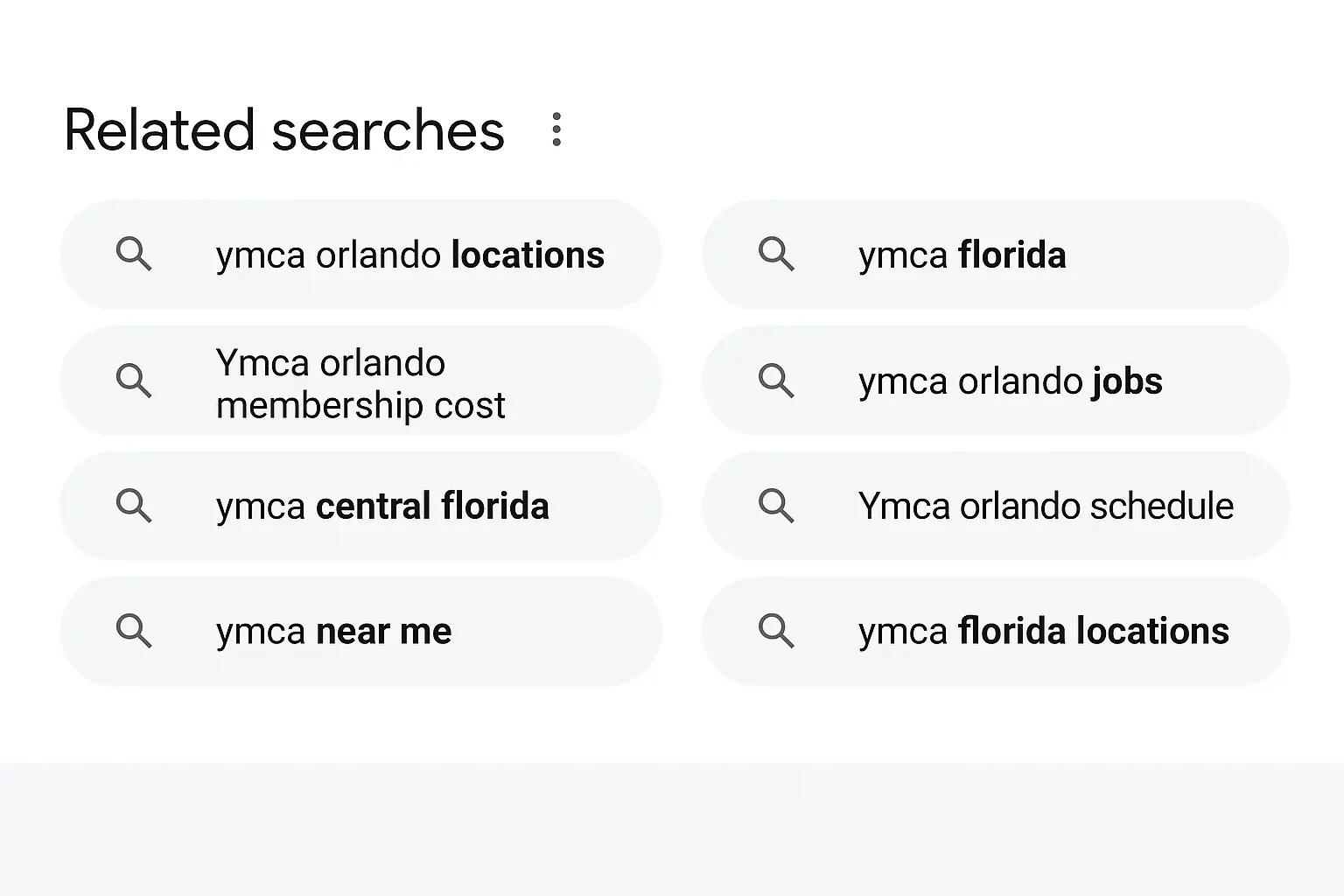
- Google Related Searches: Shown at the bottom of the Google search results page.
- Google Trends: Shows search volume for your city or region, as well as any seasonal fluctuation.
- AnswerThePublic: An effective keyword tool that combines your main keywords with various question words (like who, what, why, etc.). You also get some keyword ideas through “preposition” and “comparisons” keywords.
- Keywords Everywhere: The free version is a browser add-on that gives you related keywords and what people also searched for. This way you can fill in your keyword list without leaving Google.
Here’s a tip: Organize keywords by theme.
To keep your quality score high and write the most relevant ad copy for your ads and landing page, it’s best to group similar keywords. If your ad group contains keywords like “high school volunteer opportunities near me,” “community service near me for students,” and “donations to local food bank,” it will be challenging to write ad copy that relates to all three keywords.
Keep score
Quality Score, that is. Sometimes your keywords appear to need higher bids. And nothing affects how much you pay per click, or which search position your ad appears in more than your Quality Score. Measured on a scale of 1–10, your Quality Score is a relative measurement of how relevant and useful your ad is to someone searching for your keyword. Basically, the higher your Quality Score, the lower your cost per click.
How Google determines your quality score
Google bases your Quality Score on three factors:
- Expected clickthrough rate (CTR)
- Ad relevance
- Landing page experience
Your Google Ad Grant account can show how well these factors are performing and which could use some improvement (rated “Below Average” or “Average”). Try experimenting with more relevant or compelling ad copy, different calls to action, or refining your keyword match types to avoid irrelevant search requests. You should also review your landing pages to keep their content targeted to each ad group and optimize landing page load time for both mobile and desktop. Even excellent content can be ignored if your pages load too slowly.
How to maintain your Google Ad Grants account
You’ve set up your Ad Grant account, built your campaigns, researched all the keywords, and everything is running on autopilot, right? Not so fast. You’ll need to provide plenty of care and attention to get the most bang for your (free) buck and keep your account compliant. Google requires you to log in to the account at least once each month.
You should also make at least one meaningful account change every 90 days to show active management.
But to encourage better performance, you’ll need a more regular maintenance plan:
- Choose a captain: It’s okay to have help running your campaigns, but you need to choose one person to take full responsibility. Choose a team captain to have the final word on updates and changes to keep ads consistent and compliant. They’ll also need to stay updated on policy changes and new strategies.
- Follow a schedule: Calendars, lists, and reminders! Whatever your preferred project management tool, keeping up with important tasks is always easier if you set a schedule. We recommend looking at the account every other week on average and planning a deep dive twice each year.
- Create a style guide: Campaigns can become complex, and you may not always be the person managing them. Over time, it’s easy to forget details. A style guide for your Google Ad Grant account should include:
- How the account is structured
- Keywords to include (and avoid)
- Campaigns with a high priority or that require more attention
- Ad copy guidelines
- Targeting data to include (or avoid)
- Test, test, test: Your Google Ad Grant funds are free money, so put them to good use. Use your account to run A/B tests on ad copy, headlines, calls to action, or landing pages. You can also test different campaigns against each other. Google even provides built-in tools to run ad experiments.
How to reactivate a suspended Google Ad Grant account
Since Google updated its policy in 2018, it’s become more common for nonprofits to have their Google Ad Grants suspended. The easiest way to meet compliance requirements is to spend time reviewing your data and testing new ideas. This helps you catch potential compliance issues early and correct them before they become a serious offense.
But don’t panic if your account is suspended. This is a temporary situation, and the Ad Grant support team can help you reactivate your account. If you receive an account suspension alert email, take a moment to breathe, grab a cup of coffee, and follow these steps:
- Check the suspension alert email: The email should include the reason your account was suspended, though it may lack specific details. If the reason isn’t clear, review the Google Ad Grants Policy Compliance Guide. Update any areas where your account may be out of compliance, even if they aren’t mentioned in the alert. Common issues include falling below a 5% average clickthrough rate and using generic, single-word, or low-quality keywords.
- Call Google Ad Grant support: Once you’ve identified and corrected all policy violations, contact the Ad Grant support team. You can submit the Request to Reactivate Ad Grants Account form, but calling the Google Ads hotline at 1-866-246-6453 often results in faster and more helpful responses. Have your Google Ads customer ID ready. If you’re still unsure about the cause of the suspension, support may help narrow it down.
- Submit your account for re-review: The Ad Grant support team will outline any remaining policy violations and the steps required to fix them. After addressing all issues, contact support again to request a re-review. They will submit your account for final verification.
- Patience is a virtue: Account suspensions are more frequent now, and the support team handles a high volume of requests. The re-verification process can take 10–15 days, and escalating the case will not speed things up. You’ll receive a notification once your account is reactivated.
- Avoid future suspensions: A suspension costs time and weeks of lost advertising. Repeated violations can even result in permanent account cancellation. To avoid this, schedule regular account maintenance and review compliance requirements related to keywords, CTRs, and structure. The goal is to catch issues early and keep your account running smoothly.
Embrace the power of data
The information in this guide should help your organization get started–or back on track – with this fantastic source of free traffic. Want a deeper walkthrough of Google Ad Grants strategy, compliance tips, and campaign optimization? Download the full Google Ad Grants guide. But if you find your organization doesn’t have the time or ability to manage your Google Ad Grant account properly, the Daxko team is here to guide you every step of the way. Schedule a demo with us to learn how you can leverage Google Ad Grants for your unique nonprofit needs.